
Why Convert Text to Path?
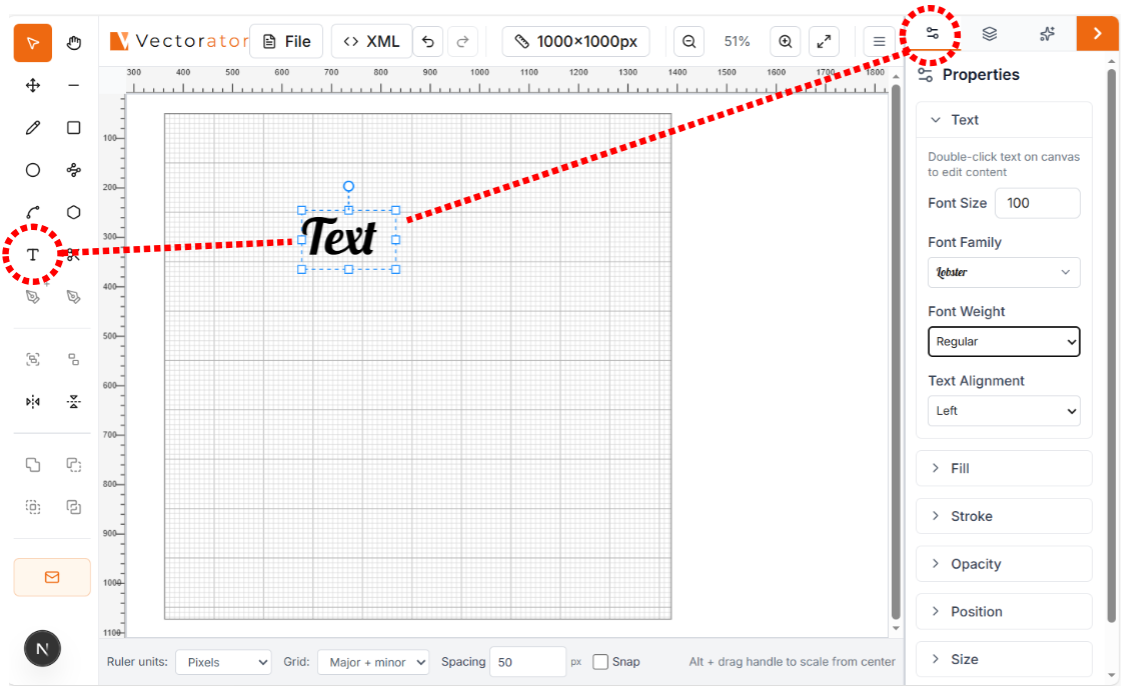
Cutting machines like Cricut and Silhouette can't cut fonts directly. They need vector paths. Converting text to path transforms your text into cuttable shapes that work with any cutting machine.
Add Text to Your Design
Click the Text tool in the toolbar, then click on your canvas where you want the text. Type your text and adjust the font, size, and style using the properties panel on the right.
Select Your Text
Click on the text with the Select tool to select it. You'll see selection handles around the text when it's selected.
Convert to Path
Right-click on the selected text and choose 'Convert to Path' from the context menu. Your text is now converted to vector paths that can be cut by any machine.
Verify the Conversion
After converting, you can edit individual letters using the Node Editor tool. If you can select and move individual nodes on the letters, the conversion was successful. The text is now ready to export for your cutting machine!
Tips & Best Practices
• Convert text before applying complex effects or boolean operations • Some fonts convert better than others - test with your chosen font • Once converted, you can't edit the text content - make sure spelling is correct first • For multi-line text, convert each line separately for better control